
SemLog
(NEW) SemLog Soft LLCParenting
3.82.28K Reviews
- Version
- 17
- Installs
- 1.00M
- Age Rating
- Everyone
Screenshots

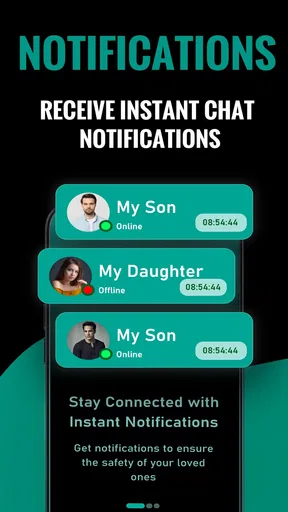
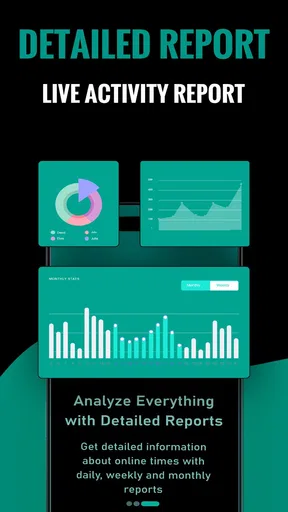
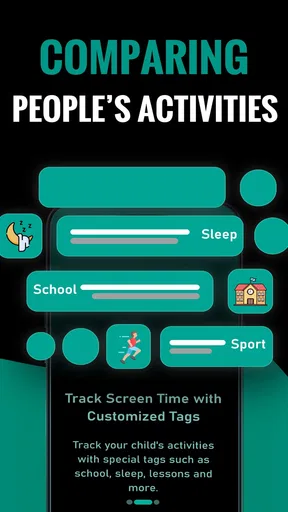
Our Review of SemLog
 Analysis by Appyee
I’d approach SemLog as a family-awareness app rather than a general-purpose organizer. That distinction matters: a parent choosing a tool to support conversations with children has a different need from someone looking for a shared calendar or a place to collect household chores. SemLog is made by SemLog Soft LLC, and its stated purpose is to encourage awareness among families and children. I would judge its usefulness by whether it helps a family make time for thoughtful discussion, not by how many tasks it can hold.
That focus makes it most appealing to parents who want a gentle starting point for talking with their children and building awareness together. It is less suitable for anyone expecting a comprehensive parenting course, a clinical resource, or a detailed family-management system. I would treat it as one possible aid in a wider routine, rather than as a substitute for direct conversation or professional advice when a family has a serious concern.
What a realistic family routine could look like
Imagine a parent with a few quiet minutes after dinner, when everyone is together but the evening has not yet become a rush toward bedtime. A family-focused app can be useful in that small window if it gives people a reason to pause and talk. I would keep the routine light: open the app together, explore what feels relevant, and let the child’s questions guide the conversation rather than turning the moment into a lesson or test.
The practical value here is not simply having an app on a phone. It is choosing a predictable moment when a child is relaxed enough to speak and a parent can listen without multitasking. If a conversation feels uncomfortable, it is better to slow down and respond in the family’s own words than to push through a screen. That approach keeps the app in a supporting role and makes the parent-child exchange the important part.
How it fits beside familiar parenting tools
Parents already have plenty of ways to share information: conversations at home, school communications, books, family websites, and broad parenting apps. Those options do different jobs. A calendar is handy for appointments, while a messaging group can coordinate pickups; neither necessarily creates a thoughtful conversation with a child. SemLog’s family-awareness focus gives it a different potential role, but I would not choose it as a replacement for those everyday tools.
Compared with a book or a trusted educational resource, an app may feel easier to bring into a casual moment because it is already on a phone. The trade-off is that screen time can distract from the very conversation a parent wants to have. I would open it with a clear purpose, then put the phone down when the discussion starts. If your family prefers paper, shared reading, or a conversation without a device, those approaches may be a better fit.
SemLog is free to install, with optional in-app purchases listed between $8.99 and $19.99 per item. I would start with the free experience and decide whether it genuinely supports your family before considering anything paid. The app is rated for Everyone, but that does not mean every topic or conversation will suit every child in the same way; parents should use their own judgement about timing and how to explain ideas at an age-appropriate level.
Small choices that make the experience more useful
A simple way to get more from a family-awareness tool is to avoid treating it as homework. Instead of opening it whenever someone remembers, choose a calm, repeatable time and keep the expectation modest. A short, voluntary conversation is often easier to sustain than a long session that feels like another obligation. If the child is tired or not interested, leaving it for another day is more sensible than insisting on participation.
It can also help to let children lead part of the discussion. Ask what they found interesting, what they already know, or what they would like to understand better. That gives a parent a chance to hear how a child is interpreting a subject instead of assuming that a screen has made the idea clear. The app can prompt attention, but a child’s own questions are a better guide to what needs explaining.
For households with more than one child, I would be careful not to assume that everyone should engage in the same way. Different ages, temperaments, and levels of curiosity call for different conversations. A parent might explore a topic with one child first, then decide how to introduce it to siblings. That extra thought can make the experience more personal, although it also means the app may require a parent’s active involvement rather than working as a set-and-forget solution.
Who may want a different kind of support
If your main goal is coordinating family logistics, a shared calendar or list-making app is likely to be more direct. If you need structured lessons, expert-backed guidance, or help responding to a particular challenge, look for a resource designed specifically for that purpose and involve a qualified professional when appropriate. SemLog makes more sense for a parent exploring family awareness than for someone seeking a complete answer to a complex parenting problem.
I would also think about how your child feels about using a phone for family discussions. Some children may enjoy having a digital prompt; others may find it awkward or prefer to talk while walking, drawing, or sharing a book. There is no need to make the app the centre of the routine. If it becomes a distraction or a source of resistance, step away from the screen and use a method your child responds to more comfortably.
Getting Started with SemLog
First things first, downloading SemLog was a breeze. It's available on both Android and iOS, so no one’s left out. Once I installed it, the interface was clean and intuitive. You don’t need to be a tech genius to navigate through it. Everything is laid out right in front of you, which makes for a smooth start.
After signing up, you’re greeted with a dashboard that feels like it’s giving you a hug. Seriously, it’s warm and welcoming. The color scheme is easy on the eyes, which is great for someone like me who spends a lot of time staring at screens.
Features that Make Life Easier
Let’s dive into the features, shall we? SemLog offers a nifty note-taking section. You can jot down ideas, create to-do lists, or even draft your next big project. The best part? You can organize these notes into different categories, so everything’s exactly where you need it when you need it.
Another highlight is the task management tool. You can set deadlines, add reminders, and even prioritize tasks. It’s like having a little nagging voice in your pocket reminding you to stay on top of things. And honestly, I kind of love it. The satisfaction of ticking off tasks is unmatched.
For those of us who tend to forget things (guilty!), the calendar integration is a lifesaver. You can sync it with your existing calendar to keep all your appointments and deadlines in one place. No more double-booking or forgetting your best friend’s birthday.
Why You’ll Fall in Love with SemLog
So, what makes SemLog stand out from the crowd? It’s the little things. Like the ability to customize your experience. You can change themes, adjust settings, and tailor the app to fit your personal style. It’s like putting your own spin on a classic recipe.
Plus, the app is constantly updated with new features and improvements. The developers seem to genuinely care about user feedback, which is refreshing. They’re like that friend who always listens and tries to help out.
Another thing that’s worth mentioning is the community support. There’s a thriving user community where you can share tips, tricks, and even vent about your productivity struggles. It’s nice to know you’re not alone in this chaotic journey.
Considering reliability and device limits
In a parenting context, reliability is less about keeping a long task list alive and more about whether an app can be opened when a useful conversation presents itself. I would avoid making any single digital tool the family’s only source of important guidance. If something matters, discuss it directly and use other trusted resources where needed. That way, a temporary app interruption or a child’s reluctance to use a phone does not derail the larger goal.
SemLog’s current version is 1.1.4, and it requires Android 7.0 or later. That makes compatibility worth checking before planning to use it on an older family device. The app has a 3.5 average from around 40,000 ratings, alongside roughly 1.6 thousand written reviews, and it has passed over a million installs. Those figures suggest a sizeable audience, but they are not a guarantee that its approach will suit your household; I would use your own first impression and your child’s response as the more relevant test.
For speed expectations, I would keep the job small: open the app when you have a particular family conversation in mind, rather than expecting it to replace every parenting resource or organise the whole household. A focused use case makes it easier to notice whether the app is helping. If using it requires more time managing the phone than connecting with your child, the balance is wrong, and a screen-free conversation is the better choice.
Final Thoughts on SemLog
To wrap it up, SemLog is more than just an app; it's a companion for those of us trying to juggle a million things at once. It’s reliable, user-friendly, and pretty darn smart. Whether you’re a student, professional, or just someone who likes staying organized, SemLog is worth checking out.
If you’ve been on the hunt for an app that simplifies your life and keeps you on track, give SemLog a spin. It's like having a tiny personal assistant in your pocket, ready to help with whatever you throw its way. Who wouldn’t want that?
For me, the strongest reason to try SemLog is its family-awareness purpose, provided that is what you are actually looking for. I would begin with a low-pressure conversation, see whether the app gives your family a useful starting point, and keep it only if it fits naturally into the way you already talk together. The key is not to hand parenting over to a phone, but to use a digital prompt when it makes listening and understanding a little easier.
Privacy and Permissions
See what permissions an app requests and how it handles your data.
- Contacts
- read your contacts
- Other
- view network connections, full network access, run at startup, control vibration, prevent device from sleeping, Google Play license check
Verdict
Strengths of SemLog
- User-friendly interface for easy navigation.
- Efficient calendar integration for scheduling.
- Real-time collaboration features.
- Comprehensive data analytics tools.
- Cross-platform compatibility.
Limitations of SemLog
- Limited offline functionality.
- Occasional syncing delays.
- Subscription required for premium features.
- No dark mode option.
- Limited language support.
Similar Picks in This Category
View All
Family Space
Motorola Mobility LLC.3.9

شرطة الأطفال - مكالمة وهمية
Oub Apps4.1

Findmykids: Parental Control
LETEM LTD4.6

Pregnancy + | Tracker App
Philips Electronics UK Limited4.8

Policía de niños - para padres
Kids police4.7

Pregnancy App
Amila4.9
Frequently Asked Questions
What is SemLog and what does it do?
SemLog is a versatile app designed to help users efficiently manage their personal and professional tasks. It integrates seamlessly with calendars and to-do lists, providing reminders, tracking progress, and offering insights through analytics. Ideal for productivity enthusiasts, SemLog aims to streamline task management for individuals and teams.
Is SemLog available on both Android and iOS platforms?
Yes, SemLog is available for download on both Android and iOS devices. You can find it on the Google Play Store for Android users and the Apple App Store for iOS users. The app is optimized for a smooth experience across different devices, ensuring accessibility and usability for all users.
Does SemLog offer any collaboration features?
SemLog comes equipped with robust collaboration tools. Users can share tasks and projects with team members, assign roles, and track progress collectively. The app also supports real-time updates and notifications, making it easier for teams to stay aligned and efficient in their workflows.
Are there any subscription fees for using SemLog?
SemLog offers a free version with basic features. However, for users looking to access premium features such as advanced analytics, enhanced collaboration tools, and priority support, there is a subscription plan available. Pricing details can be found within the app or on its official website.
How secure is my data on SemLog?
SemLog prioritizes user data security with robust encryption protocols. All data is stored securely, and the app complies with industry standards for data protection. Users can feel confident that their personal and professional information is safeguarded against unauthorized access.
